

The reality of container isolation
Docker and Podman are standard for Linux deployments because they're faster than virtual machines. However, containers share the host kernel. If one container is breached, the whole system is at risk. Unlike VMs, there is no hardware-level isolation between the guest and the host.
The rise in container adoption has been rapid. We’ve seen it become standard practice for development, testing, and increasingly, production environments. This widespread use means attackers are actively targeting container infrastructure. Trend Micro has documented a significant increase in attacks targeting container vulnerabilities, particularly those related to misconfigurations and outdated images.
A layered security approach is essential. It's no longer enough to simply secure the host OS. You need to address security at every stage of the container lifecycle – from image creation to runtime. This includes scanning for vulnerabilities, enforcing network policies, and monitoring container behavior. It’s about defense in depth.
Looking ahead to 2026, adapting security practices is critical. The complexity of containerized environments will only increase, and the threat landscape will continue to evolve. New vulnerabilities will be discovered, and attack techniques will become more sophisticated. Proactive security measures, automation, and a continuous monitoring approach will be paramount. Ignoring these shifts will leave systems vulnerable.
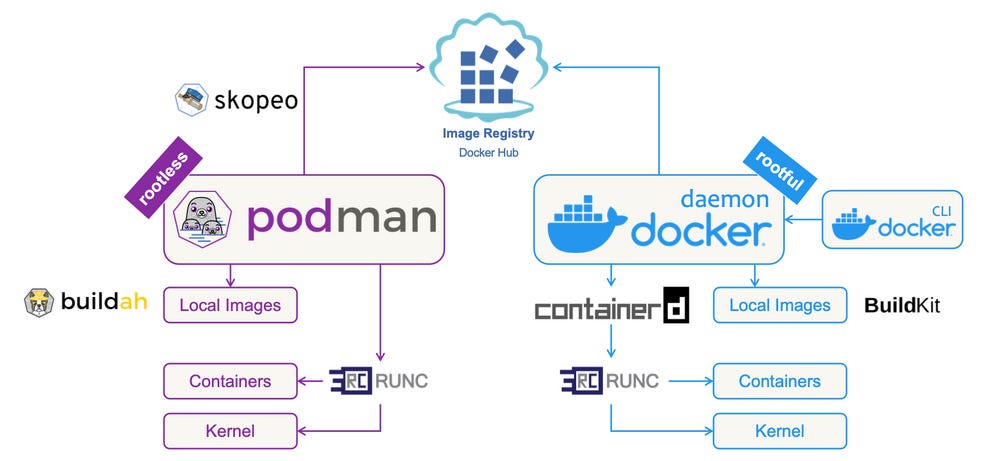
Image scanning and hardening
The foundation of any secure container is the base image. Too many containers are built on bloated images containing unnecessary packages and outdated software. This increases the attack surface and introduces potential vulnerabilities. I strongly recommend using minimal base images like Alpine Linux or Distroless images whenever possible. Alpine, for example, is a small, security-oriented distribution that significantly reduces the image size.
Regularly scanning images for vulnerabilities is non-negotiable. Tools like Trivy and Clair are excellent choices. Trivy, in particular, is easy to integrate into CI/CD pipelines and provides detailed reports on identified vulnerabilities. Clair is another robust option, often used in conjunction with Kubernetes-based container orchestration.
Hardening images involves more than just scanning. Remove any unnecessary packages, update all software to the latest versions, and carefully configure user permissions. Avoid running processes as root within the container. Create dedicated user accounts with minimal privileges. This drastically limits the impact of a potential compromise.
I’ve learned from experience that regularly updating base images is crucial, even if no immediate vulnerabilities are discovered. New vulnerabilities are constantly being identified, and updated images often include critical security patches. Automating this process is vital to ensure consistent security.
Consider using a tool like Anchore Engine to automate image analysis and policy enforcement. Anchore allows you to define policies that specify acceptable base images, vulnerability thresholds, and other security requirements. This helps ensure that all containers adhere to your organization's security standards.
- Alpine Linux: A 5MB base image that uses musl libc and busybox to reduce the attack surface.
- Distroless Images: Images containing only your application and its runtime dependencies.
- Trivy: An open-source vulnerability scanner.
- Clair: Another open-source vulnerability scanner, often used with Kubernetes.
Container Vulnerability Scanning with Trivy
One of the most critical aspects of container security is regularly scanning images for known vulnerabilities. Trivy is a comprehensive vulnerability scanner that can identify security issues in container images, filesystems, and Git repositories. The following example demonstrates how to scan a container image and interpret the results.
# Scan a container image for vulnerabilities using Trivy
trivy image nginx:latest

# Sample output format:
nginx:latest (debian 11.6)

Total: 147 (UNKNOWN: 0, LOW: 92, MEDIUM: 36, HIGH: 17, CRITICAL: 2)

┌─────────────────────────────────────────────────────────────┬────────────────┬──────────┬───────────────────┬───────────────┬─────────────────────────────────────────────────────────┐
│                           Library                           │ Vulnerability  │ Severity │ Installed Version │ Fixed Version │                         Title                           │
├─────────────────────────────────────────────────────────────┼────────────────┼──────────┼───────────────────┼───────────────┼─────────────────────────────────────────────────────────┤
│ apt                                                         │ CVE-2011-3374  │ LOW      │ 2.2.4             │               │ It was found that apt-key in apt, all versions, do not │
│                                                             │                │          │                   │               │ correctly...                                            │
├─────────────────────────────────────────────────────────────┼────────────────┼──────────┼───────────────────┼───────────────┼─────────────────────────────────────────────────────────┤
│ libc6                                                       │ CVE-2023-4911  │ HIGH     │ 2.31-13+deb11u4   │               │ glibc: buffer overflow in ld.so leading to privilege   │
│                                                             │                │          │                   │               │ escalation                                              │
└─────────────────────────────────────────────────────────────┴────────────────┴──────────┴───────────────────┴───────────────┴─────────────────────────────────────────────────────────┘
The Trivy output provides a structured view of discovered vulnerabilities. The summary line shows the total count of vulnerabilities categorized by severity levels: UNKNOWN, LOW, MEDIUM, HIGH, and CRITICAL. The detailed table displays each vulnerability with its CVE identifier, affected library, severity rating, currently installed version, and available fixed version if applicable. Pay particular attention to HIGH and CRITICAL vulnerabilities, as these pose the most significant security risks and should be addressed immediately through image updates or alternative base images.
Essential security flags for the CLI
The command line is where you interact with Docker and Podman, and it’s essential to understand how to use these tools securely. When creating containers with `docker run`, always use the `--security-opt` flag to enable security features like AppArmor or SELinux. These provide an extra layer of protection against container breakouts.
User management within containers is a critical aspect of security. Avoid running processes as root. Use the `useradd` and `usermod` commands to create dedicated user accounts with limited privileges. This minimizes the potential damage if a container is compromised. Assigning appropriate permissions is key.
Resource limiting is another important security measure. Use the `--memory` and `--cpus` flags with `docker run` (and the equivalent in Podman) to restrict the amount of memory and CPU resources that a container can consume. This prevents denial-of-service attacks and limits the impact of resource-intensive vulnerabilities.
Leverage read-only filesystems with the `--read-only` flag. This prevents containers from writing to the filesystem, making it more difficult for attackers to modify system files or install malware. Any necessary writes should be directed to volumes.
Here's a quick example of a secure `docker run` command: `docker run --security-opt apparmor=myprofile --user 1001:1001 --memory 512m --cpus 0.5 --read-only myimage`. This command enables AppArmor, runs the container as a non-root user, limits memory and CPU usage, and mounts the filesystem as read-only.
- `docker run --security-opt`: Enables security features like AppArmor and SELinux.
- `useradd`, `usermod`: Commands for managing user accounts within containers.
- `docker run --memory`: Limits the amount of memory a container can use.
- `docker run --cpus`: Limits the number of CPUs a container can use.
- `docker run --read-only`: Mounts the container's filesystem as read-only.
Docker vs. Podman: Security Command Comparison (2026)
| Security Task | Docker Command(s) | Podman Command(s) | Key Differences/Notes |
|---|---|---|---|
| Image Scanning | docker scan | podman scan | Both leverage vulnerability scanning. Podman often integrates with system-wide tools more readily. |
| User Management (Inside Container) | USER | USER | Functionality is similar. Focus is on non-root user execution for least privilege. |
| Resource Limiting (CPU/Memory) | docker run --cpus= | podman run --cpus= | Syntax is largely compatible. Effective resource limiting is a core security practice for both. |
| Security Profiles (Seccomp/AppArmor) | docker run --security-opt seccomp= | podman run --security-opt seccomp= | Both support standard Linux security profiles. Podman's rootless mode can simplify profile application. |
| Rootless Mode | Requires Docker Engine >= 23.0 and configuration | Native and default behavior | Podman prioritizes rootless operation, enhancing host security. Docker requires explicit setup. |
| Container Isolation | Namespaces and cgroups | Namespaces and cgroups | Both rely on kernel features for isolation. Podman's rootless mode adds an additional layer of isolation. |
| Image Building | docker build -t | podman build -t | Podman build can operate rootlessly, avoiding potential privilege escalation issues during build. |
| Image Verification | docker trust (deprecated, use Sigstore) | podman trust (integrates with Sigstore) | Both are moving towards Sigstore for image signing and verification. Podman's integration is generally more streamlined. |
Qualitative comparison based on the article research brief. Confirm current product details in the official docs before making implementation choices.
Network Policies & Container Isolation
Containers need to communicate with each other and with external services, but unrestricted network access can create significant security risks. Network policies are essential for controlling this communication and enforcing network segmentation. They define rules that specify which containers can communicate with which other containers, and on which ports.
Tools like Calico and Cilium are popular choices for implementing network policies. Calico is known for its flexibility and support for various networking backends. Cilium leverages eBPF (extended Berkeley Packet Filter) for high-performance networking and security. Both offer robust policy enforcement capabilities.
Restricting outbound access for containers is particularly important. By default, containers often have unrestricted access to the internet. Limit this access to only the necessary services and domains. This reduces the potential damage if a container is compromised and used to launch attacks.
Calico and Cilium are the current standards for policy enforcement. Calico is easier to set up for basic segmentation, while Cilium uses eBPF for better performance in high-traffic environments. Choose based on whether you need simple IP filtering or deep packet inspection.
Consider using a default-deny approach to network policies. This means that all traffic is blocked by default, and you explicitly allow only the necessary communication. This provides a strong security baseline and reduces the risk of unintended network access.
Content is being updated. Check back soon.
Runtime Security & Intrusion Detection
Runtime security focuses on monitoring container behavior and detecting anomalous activity while containers are running. This is where tools like Falco and Sysdig come into play. These tools monitor system calls, network activity, and other container events, looking for patterns that indicate a potential security breach.
Falco, developed by Sysdig, is an open-source runtime security tool that uses a set of rules to detect suspicious behavior. Sysdig Secure is a commercial platform that builds on Falco, providing additional features like vulnerability management and threat intelligence. Both tools can generate alerts when anomalous activity is detected.
Configuring alerts is crucial for effective runtime security. You need to define clear thresholds and notification mechanisms to ensure that security incidents are addressed promptly. Integrate these alerts with your existing security information and event management (SIEM) system for centralized monitoring and analysis.
Seccomp (Secure Computing Mode) profiles are another powerful runtime security feature. Seccomp allows you to restrict the system calls that a container can make. This reduces the attack surface and makes it more difficult for attackers to exploit vulnerabilities. You can create custom seccomp profiles tailored to the specific needs of your application.
These runtime security tools often integrate with existing security infrastructure. For example, Sysdig can send alerts to Slack, PagerDuty, or other incident management platforms. This integration is essential for streamlining security operations and ensuring a rapid response to security incidents.
- Falco: An open-source runtime security tool.
- Sysdig Secure: A commercial runtime security platform.
- Seccomp: Restricts system calls available to containers.
- SIEM (Security Information and Event Management): Centralized monitoring and analysis.
Container Security Alerts
- Unexpected Process Execution - Alerts should trigger when a container executes a process not defined in the image's original Dockerfile or container configuration. Use `ps aux` within the container (via `docker exec` or `podman exec`) to investigate.
- File System Modifications - Monitor for writes to the container's filesystem, especially outside of designated volumes. Tools like `auditd` can log file access, and `docker diff
` or `podman diff ` can show changes. - Suspicious Network Connections - Flag outbound connections to known malicious IP addresses or unusual ports. Utilize `tcpdump` or `wireshark` inside the container (again, via `exec`) or host-level network monitoring tools.
- Privilege Escalation Attempts - Detect attempts to gain root privileges within the container. Examine container logs for commands like `sudo` or attempts to modify setuid/setgid binaries.
- Image Layer Changes - Alert on modifications to base image layers, which could indicate tampering. Regularly scan images with tools like `Clair` or `Trivy` to identify vulnerabilities and unexpected changes.
- Container Breakouts - Monitor for attempts to escape the container's isolation. This is a critical security event. Examine host system logs for unusual activity originating from the container's namespace.
- Resource Usage Anomalies - Significant deviations from a container's normal CPU, memory, or I/O usage can signal compromise. Use `docker stats` or `podman stats` to monitor resource consumption.
Podman Specific Security Features
Podman offers several security features that are not available in Docker. One of the most significant is the ability to run containers in rootless mode. Rootless containers run without requiring root privileges, significantly reducing the attack surface. If a container is compromised, the attacker has limited access to the host system.
Podman’s integration with SELinux provides another layer of security. SELinux is a Linux kernel security module that enforces mandatory access control policies. Podman automatically leverages SELinux to confine containers and prevent them from accessing resources they are not authorized to access.
Podman also integrates with systemd, allowing you to manage containers as system services. This provides a more robust and reliable way to manage containers, especially in production environments. Systemd handles container startup, shutdown, and monitoring.
I've found rootless containers to be a game-changer for reducing the attack surface. They provide a significant security improvement without requiring major changes to existing workflows. It’s a feature I recommend enabling whenever possible.
Using the `--security-context` option in Podman allows you to fine-tune the SELinux context for containers, providing even greater control over access permissions. This is a powerful feature for organizations with strict security requirements.
Essential Tools for Docker & Podman Security Management

Scans container images for vulnerabilities · Detects misconfigurations · Checks for secrets and malware
Trivy is a comprehensive and easy-to-use scanner that helps identify security risks in container images and configurations.
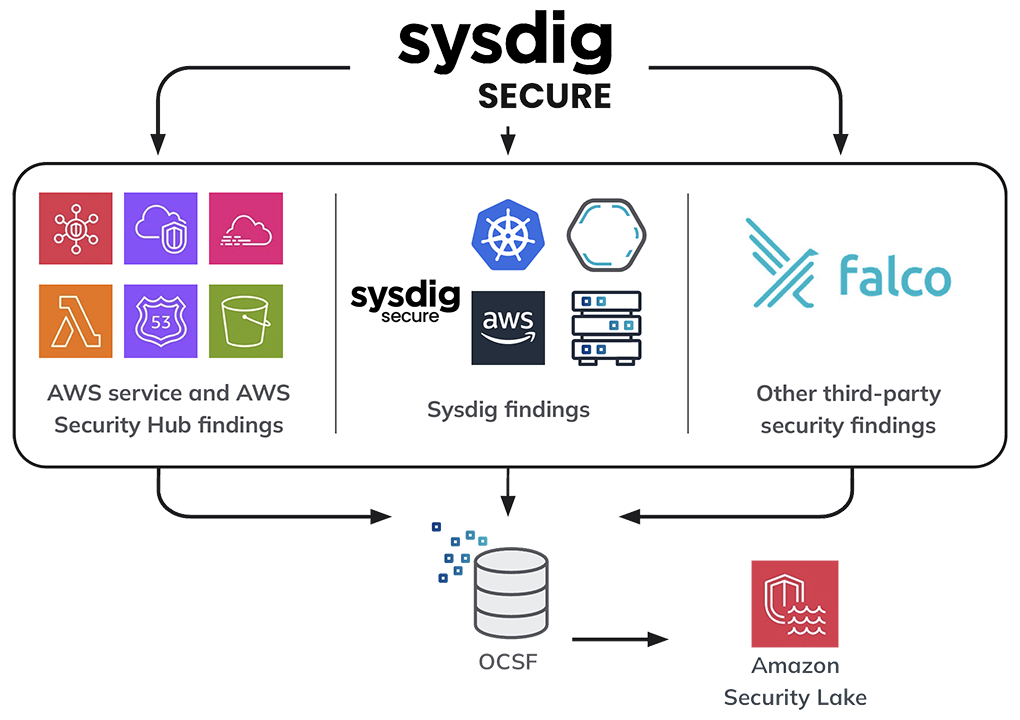
Provides runtime security monitoring · Detects threats and policy violations · Offers vulnerability management
Sysdig Secure offers deep visibility into container activity, enabling real-time threat detection and robust security policy enforcement.

Discreet appearance · Water-resistant storage · Durable construction
This unique container offers a clever way to conceal small items, blending in with everyday objects.
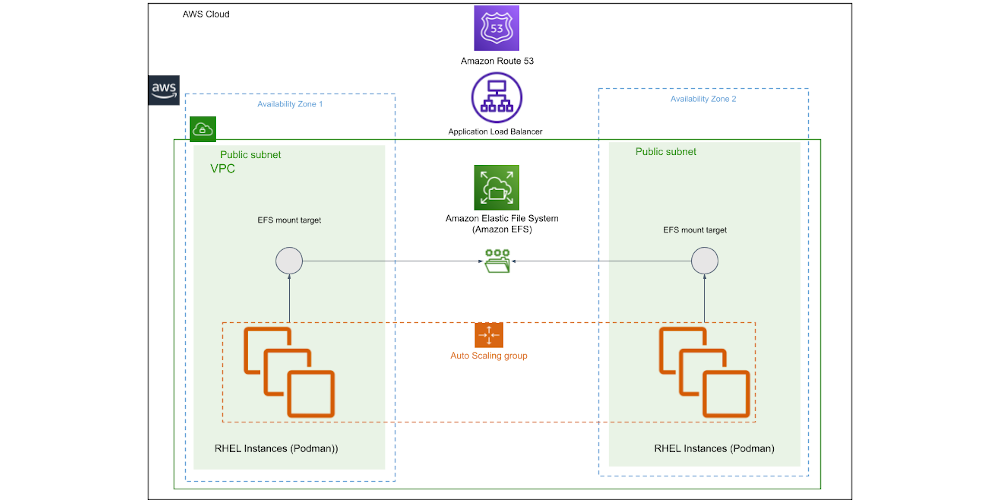
Provides security compliance scanning · Assesses system configurations · Generates compliance reports
OpenSCAP is a powerful open-source tool for assessing system security and compliance against established security benchmarks.
As an Amazon Associate I earn from qualifying purchases. Prices may vary.

No comments yet. Be the first to share your thoughts!